
Join us at the inaugural System Surveyor THRIVE user conference.
If you’re planning a new video surveillance system or upgrading existing CCTV cameras, one of the first questions is: How do you conduct a site survey for video surveillance and CCTV?
A video surveillance site survey helps system integrators, technology directors, and security teams document camera locations, coverage needs, blind spots, lighting conditions, infrastructure, and existing equipment before designing the system.
This guide breaks everything down in a clear, practical way so you can understand what to inspect, what to document, and how a digital survey improves camera system design.
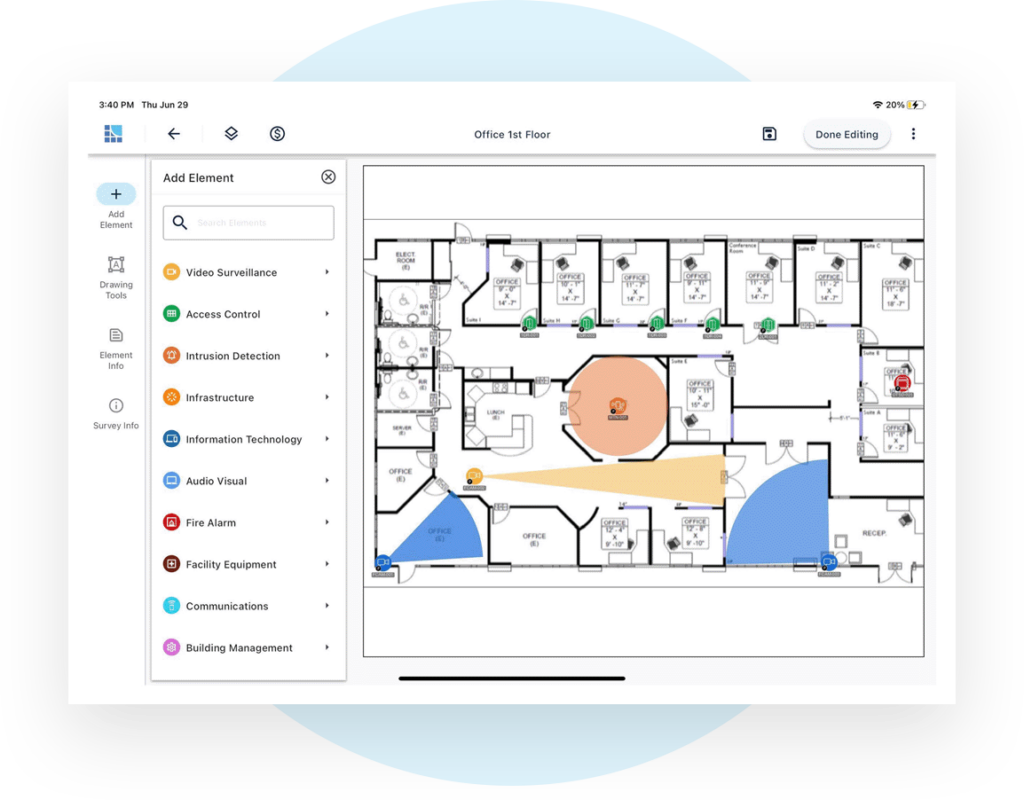
In general, a site survey for designing video surveillance systems involves:
A successful site survey creates a more accurate video surveillance design and reduces missed coverage during implementation.
A video surveillance site survey captures the details needed to design, quote, install, and manage a CCTV or IP camera system.
Common survey elements include:

A site survey for video surveillance systems looks at more than where cameras should go.
Entry and exit points are usually a top priority for video surveillance.
Survey teams should document:
Interior security camera planning depends on how people move through the facility.
Important areas may include:
Outdoor cameras require careful planning because lighting, weather, and distance all affect performance.
Site survey teams should review:
A video surveillance site survey should identify gaps in visibility.
Common blind spots include:
A complete video surveillance survey should document the camera details and infrastructure needed to support the system.
Common Details
Capturing these details helps create a more accurate camera design, bill of materials, and installation plan.

Understanding the process helps teams collect better information in the field.
A system integrator or security team reviews the facility, entrances, high-risk areas, existing cameras, and coverage needs.
The team determines what each camera needs to accomplish, such as identification, general monitoring, perimeter coverage, or incident review.
Photos, notes, and site conditions are documented for each proposed or existing camera location.
Existing and proposed cameras are placed on a digital floor plan with notes, device details, and coverage considerations.
The completed survey supports system design, camera counts, bill of materials creation, proposals, installation planning, and future lifecycle management.
Organizations relying on paper notes, static floor plans, and disconnected photos often face avoidable issues.
Common problems include:
Digital site walks to design video surveillance systems reduce these problems by keeping camera locations, photos, notes, and project details in one centralized system.
Tools like System Surveyor Camera Advisor help visualize coverage, resolution, distance, and pixels on target, making it easier to select the right camera and validate performance requirements during the site survey process.
Look for ways to:
The best site survey supports the full lifecycle of the video surveillance system, from design to installation to future upgrades.
A system integrator, security consultant, technology director, facility manager, or internal security team may conduct the survey, depending on the project.
Yes. Existing CCTV cameras, recording equipment, network infrastructure, and coverage gaps should be documented before designing upgrades.
Lighting affects camera performance and image quality. Poor lighting, glare, and nighttime conditions can all impact whether footage is useful.
Yes. When cameras and related devices are placed and tracked digitally, teams can create more accurate equipment counts, project scopes, and proposals.
Yes. A digital survey can support audits, maintenance, future camera expansion, lifecycle planning, and system upgrades.