
Let’s talk about security camera selection.
How do your system integrators choose cameras when designing a new system or building a proposal?
Is it experience? Trial and error? Manually combing through manufacturer spec sheets?
Ultimately, all these approaches come down to guesswork. It may be more or less educated, but it’s all guesswork that may or may not turn out to perform as expected.
It’s Time to Move Beyond Camera Selection By Guesswork
The real question integrators (and organizations purchasing security cameras) need to ask is deeper than just “which camera?”. Instead, focus on this question:
“What specifically does the camera need to accomplish in this location and application?”
Intelligent system design in a modern collaborative design platform allows teams to make more accurate camera decisions relying on real data and visuals, not spec sheets and best guesses.
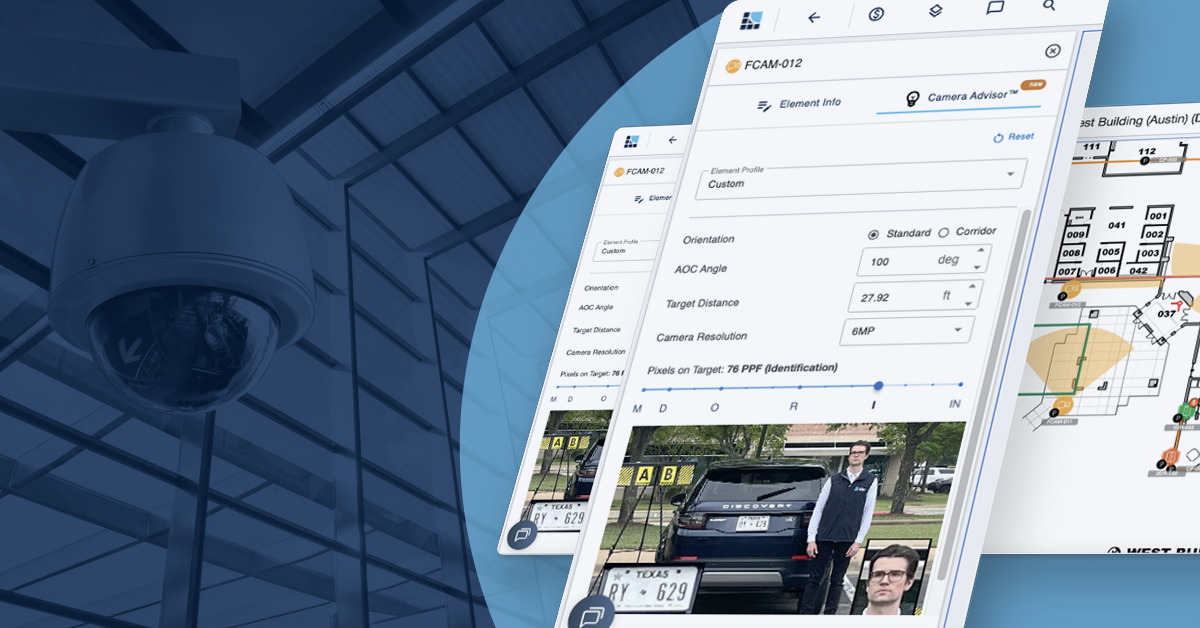
In System Surveyor, this capability is called Camera Advisor™. It allows users to identify suitable cameras for any scenario and to see exactly how a specific camera will perform in a given space.
Plus, big news for fall 2026: Camera Advisor™ is now available in the System Surveyor tablet app, not just desktop mode. Now, designers can use Camera Advisor while conducting the site walk, not just once they get back to the office.
3 Methods for Smarter System Design with Camera Advisor
Now it’s time to get specific with three ways you can use Camera Advisor for intelligent system design. When used to the fullest, Camera Advisor drastically improves and even reshapes the security camera design process.
This kind of significant change is possible only in System Surveyor, so it’s something we can only talk about in the context of our product.
So if you’re not yet a System Surveyor user, consider starting a free trial so you can test out the methods we’re about to cover. And if you’re already using System Surveyor, open up a system design so you can explore each of these as you read.
1. Visualize What the Camera Will Actually See
First, Camera Advisor helps you turn dry technical camera specs into something visual that designers and customers can instantly understand.
Camera Advisor shows sample images indicating level of clarity for specific camera models in specific scenarios. Even at a glance, customers will be able to see the expected quality difference between camera models, which makes the sales process so much smoother. If you have a customer pushing for a cheaper model that you know won’t do what they need it to do, you can show them the difference in just a few clicks or taps.
What’s more, resolution alone isn’t the whole story.
Based on the spec sheet, you can tell a customer what resolution a camera has. But that number won’t mean much on its own. Resolution alone also can’t consider distance, viewing angle, field of view, or pixels per foot.
Camera Advisor accounts for all of the above, using DORI camera standards and more. DORI standards — Detection, Observation, Recognition and Identification — quantify what a camera can accomplish at a given distance.
Applying these standards to individual camera models and usage applications is what sets Camera Advisor apart. Now, designers can evaluate the expected result (and show it to the customer) rather than simply selecting cameras based on specs, experience, and guesswork.
Key takeaway:
Camera selection should be based on the desired outcome, not just camera specifications.
2. Design for the Application, Not Just the Coverage
Next up: different situations or applications require different levels of image detail, and accounting for this in the surveillance camera design process is crucial.
Intelligent system design means shifting the conversation from “What camera covers this area?” to “What do we need this camera to accomplish?”
For example:
- Some spaces need general monitoring, while others need identification capabilities.
- Some vehicle monitoring systems need simply to recognize a car is present (such as for a lift gate); others need license plate recognition (LPR) tech.
- Some locations may need additional capabilities like people counting, object recognition, or AI analytics.
When you start with the question “What camera?”, you may fail to arrive at an answer that actually solves your customer’s needs.
But when you start with “What need?”, you gain a critical perspective that helps you answer the rest of your questions, including which cameras to choose.
Another way to picture this way of designing:
security objective → required image quality → appropriate camera
Camera Advisor helps make this approach possible. The old approach forces designers into a hunt and peck approach where they start with a specific camera and work out what it can do.
But the Camera Advisor feature can recommend multiple cameras based on the desired image quality and resolution, providing concrete sample imagery at various distances and under different lighting conditions.
Both over- and under-specification are expensive ditches to fall into. Overspec, and you could lose customer trust (or lose a customer if your proposal isn’t competitive on cost). Underspec, and you’ll deal with upset customers and costly rework on the back end of projects.
Starting with the right question, with identifying the security objective and necessary capabilities, avoids both ditches. Camera Advisor helps you do it efficiently and convincingly.
Key takeaway:
The right camera is the one that delivers the required result for the application, and the right tool helps you identify right-fit cameras quickly and confidently.
3. Bring Intelligent Camera Design Into the Field
Finally: don’t wait until you’re back at the office to get smarter on camera design.
Traditionally, system integrators gather site information in the field, then head back to the office to make sense of those notes and decide on specific design details, like which cameras to use in which locations.
This approach remains a valid, useful option that will still be a part of most security system design workflows.
What’s different now is that you don’t have to wait till you’re back in the office to start design work. With Camera Advisor now available in the System Surveyor tablet app, designers can evaluate and refine camera choices while they’re still on site doing the site survey.
This means they can interact with customers during the site walk, even showing them on the tablet the difference that various camera models would make in a given location while they’re standing in that location.
Visualizing camera placement, coverage, and image quality requirements in the actual environment can increase accuracy, and many integrators find it to be a powerful sales tool, too.
Working this way helps to surface assumptions or unspoken details, speeding up design and saving on costly rework later on.
Think of customer comments like “Well, actually now that I see it, we do need low-light capability here”: imagine getting that comment at the very start of the camera coverage design process instead of after installation!
All of this is anchored in System Surveyor’s broader approach, where we enable visual, collaborative system design where customers, integrators, vendors, and others can interact on the same system design built on the same digital floor plan. Clearer, more detailed, visual information up front means faster proposals, cleaner installs, and less rework.
Key takeaway:
Intelligent system design doesn’t have to wait until you’re back at your desk. It can happen where the design starts: in the field.
The Bigger Picture: What Makes Camera Advisor Different?
Camera Advisor isn’t a standalone product. Instead, it’s one feature inside a powerful security system design software platform, which makes it easy to overlook (even for current System Surveyor customers).
When applied to security system design, it’s much more valuable because it brings intelligence, automation, and visualization into camera selection and system design.
It helps move security professionals from:
- Guessing → validating
- Specifying → designing
- Technical data → visual decisions
- Office-based design → field-based design
Camera Advisor is one example of where intelligent system design is taking physical security design: it’s becoming more visual, more collaborative, more automated — in other words, more intelligent.
Choose System Surveyor to Access Camera Advisor and Much More
Better security system design and camera selection starts with understanding exactly what each camera needs to accomplish in its specific application.
Visualization is a powerful way to give designers greater confidence and communicate decisions and rationale to customers.
Camera Advisor delivers both intelligent camera selection and visualization, and now you can bring it out of the office and into the field with the System Surveyor tablet app.
System Surveyor is site survey software and much more, powering the entire system design and proposal process. With System Surveyor and Camera Advisor, you can design smarter, reduce guesswork, and confidently create system designs.
And because those designs are visual, not just a long list of specs, they become an additional sales tool, showing customers exactly what they’re getting in a visual format that they can easily understand and work with.
Ready for the next step? See Camera Advisor in action: Explore Camera Advisor.
Frequently Asked Questions About Camera Advisor
Camera Advisor is a feature within System Surveyor’s system design platform that helps integrators choose and place security cameras based on real performance data instead of guesswork. It uses DORI standards, sample imagery, and site-specific factors like distance and lighting to show designers and customers exactly what a given camera model will capture in a specific location.
DORI stands for Detection, Observation, Recognition, and Identification, and it describes what a camera can reliably accomplish at a given distance. Camera Advisor™ applies these standards to individual camera models and use cases, so designers can match a camera’s real-world capability to the outcome a location actually needs, rather than relying on resolution numbers alone.
Yes. Camera Advisor is now available in the System Surveyor tablet app in addition to desktop mode. This means system integrators can evaluate and compare camera options while they’re still on site, showing customers the expected image quality in the exact location being surveyed instead of waiting until they’re back at the office.
Camera Advisor lets system integrators start from the required security objective and image quality rather than a specific camera model, then recommends cameras that meet that need. Getting this right up front means there’s less chance of rework, change orders, or an unhappy customer after installation.
Camera Advisor is included as part of the System Surveyor platform rather than sold as a standalone product. Start a free trial to explore Camera Advisor and the platform’s other collaborative design features, while existing customers can access it directly within any of their system designs.

Maureen Carlson is co-founder and president of System Surveyor, the leading digital platform for physical-security site surveys and system design. With 25 + years in B2B SaaS and security technology, she leads the go-to-market and operations with a top notch team. Under her leadership, System Surveyor has grown into an industry-defining software used worldwide to streamline system design, enable collaboration, and raise the bar for security and technology professionals. Maureen enjoys building relationships in the industry and user community to build sustainable, high growth business. In her spare time in beautiful Austin, you’ll find her spending time outdoors, on a tennis court, reading or with family and friends.