

You don’t have to be in physical security or system integration long before you’ll hear the phrase “spots and dots.” You might even use the phrase yourself, something like “let’s just drop some spots and dots now that we’ve finished the site walk.”
It’s a familiar, well-worn shorthand for marking devices on a paper floorplan — literally marking spots and dots onto paper. While this approach is quick, relatively simple, and well established, it leaves plenty on the table. The approach can help visualize basic device placement, but neither spots nor dots can capture the why, how, or what behind an integrated security system design.
Today’s clients expect more than spots and dots: they want clarity, confidence, and collaboration from the jump. Digital security system design platforms go far beyond dots on paper, helping integrators stand out, win more bids, and deliver cleaner, more accurate system designs.
What “Spots and Dots” Really Means (+ Where It Falls Short)
“Spots and dots” is an industry shorthand that describes the way many system integrators mark up a printed floorplan or PDF. “Dots” are basic markers or icons placed on a drawing to show approximate device locations—like cameras, access control readers, sensors, speakers, Wi-Fi APs, etc. They don’t include specs, orientation, coverage, cabling, or configuration details.
Think of dots as:
“Here’s roughly where something goes.”
“Spots” usually refer to the general location or placeholder position for future equipment. Sometimes people use spots interchangeably with dots, but often:
- A spot = a general area or place where a device is needed
- A dot = a specific point/symbol representing the device on the plan
Together, people often say “we’re just doing spots and dots” to mean:
We’re not designing yet—we’re just marking conceptual device locations.
The problem with this approach is that it can’t convey deeper context, system logic, or interdependence, which means that when you get back to the office, those details are fuzzy at best. Why do a site survey with only spots and dots?
Other problems with the spots and dots approach:
- Simple visuals don’t show coverage areas, fields of view, or device specs.
- Flat floorplans don’t support collaboration or effective documentation.
- Limited information creates ambiguity down the line (for clients, engineers, installers, and maybe even you).
- Static files or printouts don’t scale or update well.
The long and short of it, it is not enough to get to an accurate system design and it rarely inspires confidence for a customer when you do this manually in front of them.
Digital system design tools offer a better, more modern approach that brings those dots to life, transforming static plans into dynamic, data-driven system designs that your whole team can collaborate on.
Let’s dive into three specific ways digital system design tools help you accomplish more than spots and dots.
Benefit #1: Visual Intelligence (Coverage, Context & Confidence)
Creating a digital system design both gives you and demonstrates visual intelligence: instead of dots on paper, you gain smart visuals that demonstrate exactly how specific pieces of camera hardware will cover real locations at the customer’s property. Not only does this help you build a better system design from the beginning, but it also helps show your clients that you truly understand what they need.
Effective security system design demands far more than a few dots on a floorplan. We know that a photo is worth a thousand words and in system design with several collaborators – it is the difference maker in accurate, effective projects. Without photos, environmental context, and visual documentation of real-world conditions, critical details get lost.
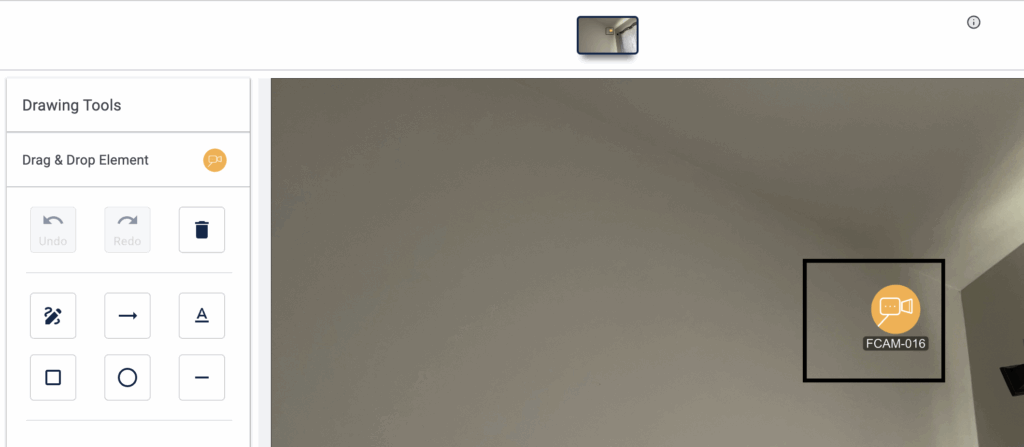
Lighting challenges, obstructions, mounting surfaces, ceiling heights, and other considerations rarely show up in spots and dots alone. That missing context slows down design, weakens estimation accuracy, and forces guesswork when engineers attempt to translate simple marks into a fully scoped system. Photos and visual references become the bridge, enabling far more precise planning, quoting, and execution.
System Surveyor Camera Advisor™ is an example of how this works in a digital system design platform. Once you add a camera to a floor plan in System Surveyor, open Camera Advisor to identify exact camera hardware according to DORI specifications to identify the proper camera to reach resolution needs with pixels per foot (PPF) otherwise known as pixels on target. Identify the area of coverage (with a visual cone showing field of view) to show the client or decision maker visually what they will achieve which is far better than simple “spots and dots”.
When combined with site photos captured directly in the digital design, this visual intelligence becomes exponentially more powerful. Instead of relying on memory or vague handwritten notes, designers and engineers reference the actual environment in real time — confirming mounting feasibility, validating angles, and anticipating installation challenges before they become change orders and truck rolls.
Compare that to just a single spot on a paper floorplan: now, your “spot” shows area of coverage, depth of view, image quality, and specific hardware attributes—all of which update in real time.
Gaining this level of visual intelligence unlocks tons of follow-on benefits too:
- Clients can visualize what they’re getting, improving buy-in and confidence.
- You communicate with greater transparency and clarity, building more trust sooner.
- Problems, gaps, and miscommunications show up sooner in the process, allowing you to fix them in the early design stage—not at or post-install.
You’re collecting comprehensive design intelligence that supports accurate engineering, reliable estimation, and smoother execution—positioning you as a true system designer rather than someone simply placing dots.
Elevate your presentation and achieve true collaboration with clients in System Surveyor: Watch Supercharge Your Sales Best Practice #1: Engage Collaboratively with the Customer with System Surveyor CEO & Co-Founder Chris Hugman.
Benefit #2: Data-Driven Collaboration (Speed, Accuracy & Buy-In)
Moving from static PDFs to shareable designs that live in the cloud changes the entire system design workflow. No more emailing versions upon versions of very similar PDFs back and forth (and hoping no one grabs the wrong version). Instead, all interested parties work in the same system design and can see and work with each other’s changes.
With digital system design, everybody is literally on the same (digital) page or canvas: integrators, sales, engineers, and even clients and vendors all work in the same dynamic design. This reduces the risk of mistakes in handoff, eliminates versioning issues, and clears up all sorts of miscommunication.
Plus, this “page” is far more dynamic and interactive than a PDF. A System Surveyor design can contain photos, annotations, device specs, pricing, and more—not to mention the area of coverage and image clarity information that we mentioned under Benefit #1.
Imagine what this kind of data-driven collaboration could look like. A salesperson captures devices and coverage zones in System Surveyor during a site survey, using our iPad app. As soon as the salesperson uploads that information, the engineering team logs in, refines camera models (using Camera Advisor), and generates an automated bill of materials—all in that same design. Clients get a decision-ready proposal in half the time (or better), and they can explore that proposal visually and add their own feedback if something isn’t quite right on the first draft.
The result: faster proposals, fewer misunderstandings, and less costly rework. Better than all of those is the continued growth in client trust and confidence.
Learn how to introduce clients to the idea of digital system design collaboration: Watch Supercharge Your Sales Best Practice #2: Bring the Customer into the Design Process.
Benefit #3: Integrated Intelligence (Design, Deploy & Maintain)
Your clients may want to think of physical security projects as static, one-and-done projects that they don’t have to think about for another decade or more. But as physical security technology evolves, this approach isn’t working anymore. System integrators who are ready to step up and deliver ongoing value stand to reap ongoing relationships and revenue. The name of the game is to help manage the lifecycle of the system.
Spots and dots aren’t much help here. They’re static, so they can’t evolve as the project moves from design to deployment to maintenance.
As changes happen during deployment, spots-and-dots diagrams rarely get updated. And it’s hardly realistic to imagine tracking maintenance, planned upgrades, or software updates that way.
Digital system design delivers integration that unites every stage of the project because it gives integrators and customers dynamic, living system designs. With a digital design tool, integrators can:
- Integrate design with product specifications, cost estimates, and BOMs.
- Use visual data to generate reports and documentation instantly.
- Simplify service and maintenance with accessible, editable designs that can handle granular detail, updates, replacements, and add-ons.
With integrated intelligence in System Surveyor, you can future-proof your designs and make easy updates over the lifecycle of a system by maintaining a digital as-built. This is an incredibly powerful way to demonstrate ongoing value to clients and retain them for the long term.
See how to do this in System Surveyor: Use Data to Drive Customer Decisions and Demonstrate ROI.
Supercharge Your Sales Process
Attention integrators: We know System Surveyor can transform your sales: our platform speeds up system design, shortens time to decision-ready proposal, and gives clients a proposal that’s light-years beyond what they’ve seen before.
But we also know that changing the way you sell is a big jump. So we’ve produced a free video series made just for you, showing you how to make the leap. In this series of 10 videos (each 2 or 3 minutes long and jam-packed with value), System Surveyor CEO Chris Hugman shares his firsthand insights on how integrators can modernize their sales approach and close more deals.
From Dots to Differentiation: Win More Sales & Build Trust
Spots and dots may have gotten you started in physical security system integration, but if you’re still sticking (pun intended) with the old way of building system designs, it’s time to upgrade to digital system design, because:
- Visual clarity improves accuracy and wins confidence.
- Collaboration moves projects forward faster.
- Integration saves time and makes you valuable across the lifecycle.
Whether you’re considering System Surveyor for the first time or you’re looking to level up your skills, digital system design is the true differentiator you need to go from spots and dots to clarity, collaboration, and integration.
If you aren’t using System Surveyor yet, now is the time to see what you’ve been missing: sign up now for your free trial.
Current System Surveyor user? Our free System Surveyor Certification Program maximizes your investment and shows even more value to your clients and prospects. Start certification now
FAQs
Spots and dots only show rough device locations and lack critical context for security devices like area of coverage, specs, environmental conditions, and installation details. Digital security system design provides visual intelligence—fields of view, image clarity, device attributes and site photos—giving teams and clients clarity, accuracy and real-time collaboration that penciled spots and dots on a paper floor plan cannot deliver.
You avoid guessing on device selection, creating coverage gaps, miscommunicating between teams, producing inaccurate estimates and losing important site details. You also prevent version confusion, reduce rework and change orders, and avoid presenting unclear proposals that undermine client confidence.
Import the floor plan into the System Surveyor platform, drag and drop security devices to replace your “dots”, and use Camera Advisor™ to set correct hardware and visualize coverage. Add site photos and device attributes, then share the design for team or client collaboration. The platform automatically updates specs and can generate a bill of materials to move the design to a decision-ready proposal.

Maureen Carlson is co-founder and president of System Surveyor, the leading digital platform for physical-security site surveys and system design. With 25 + years in B2B SaaS and security technology, she leads the go-to-market and operations with a top notch team. Under her leadership, System Surveyor has grown into an industry-defining software used worldwide to streamline system design, enable collaboration, and raise the bar for security and technology professionals. Maureen enjoys building relationships in the industry and user community to build sustainable, high growth business. In her spare time in beautiful Austin, you’ll find her spending time outdoors, on a tennis court, reading or with family and friends.