

What makes a site survey great?
It has to be more than just taking photos and marking devices on a floor plan.
To answer this question, it helps to ask a different, more operations-focused question: what do design, estimating, and installation teams need to move forward with both accuracy and confidence?
Get it right, and you have a clear picture of what a great site survey should do.
It should identify and document:
- What exists
- What needs to change
- What the customer needs (and/or thinks they need)
- Where technology should go
- What infrastructure that technology needs
- Where existing infrastructure is sufficient and where new is required
- What could prevent the plan and the system from working
- What installation requirements exist
A good rule of thumb we use when we’re assisting with site walks: If the survey doesn’t give design, estimating, and installation teams enough information to move forward confidently, it isn’t finished.
What is a Security Site Survey?
A security site survey is a structured assessment of a facility’s physical environment, existing security infrastructure, operational needs, risks, and installation requirements. For system integrators, the site survey is the first and best opportunity to gather what you need for proposal building and system design.
Not every survey meets the same level of quality or detail. A basic survey might include a paper floor plan, some photos snapped on a phone or tablet during the site walk, a list of device types, and a handful of notes.
But a quality site survey conducted with industry best practices includes much more, including conditions, customer requirements, security objectives, coverage, infrastructure, installation considerations, scope, documentation, and open questions.
And a digital security site survey using collaborative system design tools does it all in a visual format that grows buy-in and customer understanding.
The Security Site Survey Checklist We Use in the Field
Every great survey needs to capture six things:
- The site itself (what exists)
- What the customer is trying to solve (what needs to change)
- Anything already deployed (what the customer needs)
- Coverage needs and corresponding placement (where technology should go)
- Installation-breakers (what could derail the plan or cause an unnecessary truck roll)
- A comprehensive record (everything the customer needs)
As we’ve worked with countless system integrators and physical security leaders, we’ve built these six things into a security site survey checklist that helps us every time we’re in the field. Download it to take into the field.
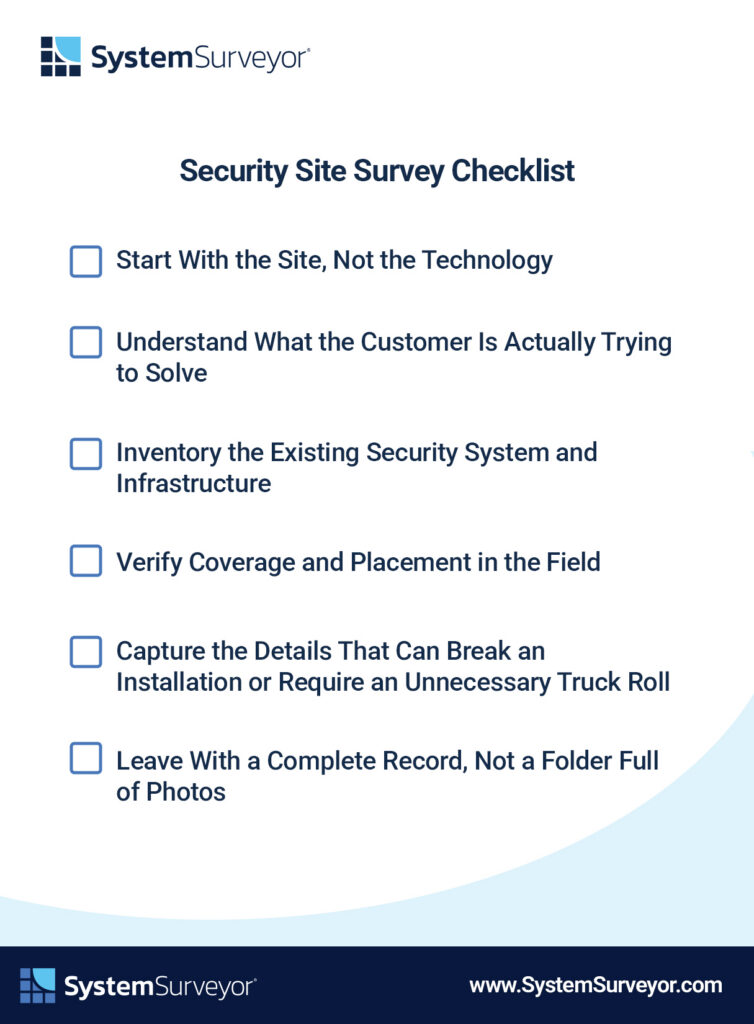
1. Start With the Site, Not the Technology
First, start with the site itself. This is a site survey, after all!
It’s a given that you’ll need correct floor plans or satellite imagery, and we never start a site walk without them. These are a crucial starting point, but they don’t tell you everything. Here’s the key: the site walk reveals what the floor plan doesn’t tell you.
These are the most important areas to verify:
- Floor plan or imagery is of correct physical space
- Scale is accurate
- Entrances and exits accurate and clearly marked
- Parking and exterior areas included
- Restricted areas
- Interior circulation
- Walls and obstructions
- Ceiling heights
- Lighting
Across all of these areas, you need to capture detail with a special focus on any discrepancies between plans and actual conditions.
We know this is a lot of information to capture, far more than is possible using a pen and a yellow pad. A digital site survey tool makes it so much easier to capture this level of detail.
Plus, System Surveyor’s new AI Notetaker can capture and summarize comments from the site walk so nothing gets dropped between the site walk and the office.
2. Understand What the Customer Is Actually Trying to Solve
The site survey is a place to gather requirements, not just technical data. Often what the customer says during the walk reveals gaps between what they said they wanted and the real problem they’re seeking to solve.
This becomes an opportunity not just to upsell, but to add real value. Installing a new system that fits exactly what they asked for but doesn’t solve their problem isn’t a very satisfying win. Catching that discrepancy before you even finish designing elevates system integrators and builds trust you can leverage into long-term relationships.
To get at this, ask:
- What prompted the project?
- What isn’t working?
- What incidents or vulnerabilities are driving this change?
- What areas need better visibility?
- Who needs access?
- What operational problems are we seeking to solve?
- Do you have future expansion plans?
- What does success look like on this project?
One tool we use during this process is Camera Advisor™. Built into the System Surveyor platform, it shows customers what level of detail various specific camera models will capture at various depths and conditions. It also works in reverse: if the customer knows they need identification-level quality in a dimly lit parking garage, we can enter those parameters and instantly suggest suitable camera models.
3. Inventory the Existing Security System and Infrastructure
Next, we document what can stay, what needs to go, and what needs to change.
This includes cameras, access control readers, door hardware, intrusion devices, sensors, intercoms, emergency/security devices, network closets, switches, power, cabling, conduit, mounting locations, equipment rooms, control panels, reusable devices, and end-of-life equipment. Every part of the system and supporting elements like physical and technology infrastructure needs to be documented.
4. Verify Coverage and Placement in the Field
We verify details for every proposed device possible while we’re still in the field.
It’s possible to get this information later, but the more complete the picture we get during the site walk, the better the first draft of the proposal is going to be.
For every device we propose, we verify what it needs to see, detect, or control.
- Cameras: Field of view, critical areas, blind spots, lighting, mounting, obstructions
- Access control systems: Door type, hardware, reader location, REX, door contacts, power, cabling
- Intrusion detection and sensors: Coverage, detection area, environmental factors, obstructions
The easiest way to do this work in the field is in security system design software. System Surveyor’s tablet and web applications give you an interactive site plan where you can see some of these elements immediately and a canvas where you can document everything you learn. Use System Surveyor Camera Advisor™ to visualize the right device every time. It’s available on the tablet app to you can use it during your site walk and on the web for use back at the office.
5. Capture the Details That Can Break an Installation or Require an Unnecessary Truck Roll
Another important step: look past “where does the camera go?” and ask some deeper questions about what could make an installation fail or require costly rework and extra truck rolls.
The big one is missing parts: a camera is useless without the proper brackets and accessories. Even scarier is missing infrastructure: a camera with no power routed to it is a much bigger fix after the fact.
Other areas to consider here are construction type, mounting surfaces, conduit, distance to closets, and access to installation areas,
Why this matters: it’s possible to miss a tiny detail during the site walk that ends up rippling through the entire project. A polished proposal that looks accurate could turn into an expensive change order.
This is one of the reasons we built AI Notetaker. While you’re on the site walk, you’re gathering data but also interacting with the client. It’s tough to write down every detail, but AI Notetaker hears it all and finds those key insights for you.
6. Leave With a Complete Record, Not a Folder Full of Photos
Finally, we make sure the record is complete and organized before we leave. The goal is to connect the entire chain:
location → device → photo → requirement → note → coverage → design
All in one accessible platform where our team (and even clients) can interact, comment, and edit.
With this approach, survey information flows through the whole process: system design, estimating, proposal, engineering, installation, as-built documentation, and all the way to lifecycle management.
This kind of single source of truth is powerful, especially compared to the way many integrators still operate (a plain PDF floor plan, photos in your camera roll, comments scrawled in a notebook, and a dozen email chains).
The 10 Questions We Never Leave a Site Without Answering
1. What problem is the customer trying to solve?
This question uncovers the operational need, security concern, or recent incident driving the project. The answer helps you define the right physical security solution instead of simply replacing devices without addressing the underlying problem.
2. What security systems are already in place?
Inventory the existing video surveillance, access control, intrusion detection, intercom, and related systems, including their age, condition, manufacturer, and integrations. It shows what the new security system design must connect to, support, or account for.
3. What needs to stay, change, or be replaced?
Determine which devices and infrastructure still meet the customer’s needs and which create performance, compatibility, or maintenance issues. This keeps the project scope accurate and prevents useful equipment from being removed or outdated components from being carried forward.
4. Where are the highest-priority areas?
Identify the entrances, exits, assets, restricted spaces, high-traffic zones, and vulnerable areas that carry the greatest risk. These priorities guide device placement, camera coverage, access control planning, and budget decisions.
5. What does each proposed device need to cover?
Define the field of view, level of image detail, detection zone, door, asset, or activity each device must address. During a site walk for security cameras or access control, for example, this answer helps confirm that the selected technology and placement can meet the customer’s actual security objective.
6. What physical conditions could affect installation?
Document ceiling heights, wall construction, lighting, weather exposure, obstructions, mounting surfaces, lift requirements, and access restrictions. These field conditions affect labor, equipment selection, installation methods, scheduling, and cost.
7. What infrastructure can be reused?
Verify the condition, capacity, location, and compatibility of existing cabling, conduit, power, switches, network closets, mounts, and related infrastructure. Reuse can control costs, but only when the infrastructure supports the proposed system and installation requirements.
8. What information is still missing?
Flag unanswered questions, unavailable drawings, unknown equipment details, and areas that could not be accessed during the security site assessment. A clear list of gaps tells the team what to confirm before finalizing the design, estimate, or proposal.
9. What assumptions need to be validated?
Record anything the project team currently believes about coverage, network capacity, power, pathways, integrations, site access, or customer responsibilities. Validating those assumptions early reduces change orders, design revisions, and unnecessary return trips.
10. Has the customer had the opportunity to show you what they need in terms of resolution to really solve the problem?
Confirm whether the customer needs general awareness, detection, recognition, or identification in each critical scene. Showing the expected image detail during the site walk aligns expectations and supports better camera selection and placement.
And finally, the completion test: Can another person design and estimate the project from what we documented?
What a Great Site Survey Should Produce
A great survey becomes the foundation for the entire project lifecycle. To do this, the site survey needs to produce quite a bit of information:
- Verified digital floor plan/site map: An accurate, scaled visual record that reflects the facility as it exists, including entrances, exits, walls, restricted areas, exterior spaces, and any differences from the original plans.
- Existing-condition documentation: A complete inventory of deployed security devices, door hardware, network equipment, power, cabling, conduit, mounting conditions, and other infrastructure that could affect the project.
- Proposed device locations: Clearly marked placements for cameras, readers, sensors, intercoms, panels, and other equipment so design, estimating, and installation teams work from the same plan.
- Coverage areas: Visual confirmation of each camera field of view, detection zone, controlled opening, or monitored area, including blind spots and obstructions that require attention.
- Photos tied to locations: Site photos connected directly to the relevant room, door, device, or plan location so teams can understand field conditions without searching through a separate camera roll.
- Customer requirements: Documented security objectives, operational needs, user expectations, compliance considerations, and success criteria that will guide the physical security system design.
- Infrastructure notes: Details about available network capacity, switches, power, cabling, conduit, pathways, closets, equipment rooms, and what existing infrastructure can be reused.
- Installation considerations: Specific notes on mounting surfaces, ceiling heights, construction type, environmental exposure, site access, lift needs, working hours, and other factors that affect labor and scheduling.
- Device counts: A reliable preliminary quantity for each device, accessory, mount, power supply, license, and supporting component needed to build an accurate bill of materials.
- Remaining open questions: A visible list of missing information, unverified assumptions, inaccessible areas, and follow-up items, along with the person responsible for resolving each one.
- Budget/scope information: Enough detail to define project boundaries, identify alternates or phases, estimate labor and materials, and prepare a proposal that reflects the customer’s priorities and budget.
Why Digital Site Survey Software Makes the Checklist Easier to Execute
We’ll be honest: quite a bit of what we’ve shared already isn’t possible using a manual workflow.
The typical manual workflow looks like this: paper floor plans → handwritten notes → phone photos → spreadsheets → emails → rework
But system integrators using digital site survey software reshape the entire workflow: digital floor plan → field data → photos → device placement → coverage → collaboration → design → BOM → proposal → as-built
Modern security system design software gives you the power to collect detailed information and even start designing while you’re still on site.
And now, with System Surveyor AI Notetaker, you can capture verbal details you might have missed. When you get back to the office, you can add those summary insights into the design.
It’s still your expertise powering the design. Now you have better tools for information capture and system design. Watch a short overview video of System Surveyor to see how it can help you.
The Great Site Survey Test
Here’s the most important question of all:
Using your current site survey process, could your engineer, estimator, or installer understand the site without calling you back?
In other words: Do you have what you need after the site survey to build an accurate proposal and system design?
If yes, the survey is complete.
If not, you have more work to do and more questions to answer.
You might also need a new approach for how you conduct site surveys and design systems. System Surveyor is purpose-built for collaborative physical security system design. It delivers every capability you need to capture the right site walk data and to design accurate systems faster.
See how System Surveyor turns the site survey into the starting point for security system design. Start a free trial today.

Maureen Carlson is co-founder and president of System Surveyor, the leading digital platform for physical-security site surveys and system design. With 25 + years in B2B SaaS and security technology, she leads the go-to-market and operations with a top notch team. Under her leadership, System Surveyor has grown into an industry-defining software used worldwide to streamline system design, enable collaboration, and raise the bar for security and technology professionals. Maureen enjoys building relationships in the industry and user community to build sustainable, high growth business. In her spare time in beautiful Austin, you’ll find her spending time outdoors, on a tennis court, reading or with family and friends.